
Do you know how work actually gets done on your shop floor — by whom, with what deviations?
Most manufacturers have work instructions. What they lack is visibility into execution: is the work done as intended, by the right person, using the right version? Instant Instructions — developed with TNO — gives you that control. From video to standardised work instruction, with a review workflow, validation, and a traceable session log per execution.
Start with one process — extend later with our planning module for skill-based task release.
 VDL Group
WILA
Meijer Group
VDL Group
WILA
Meijer Group
“TNO is developing tools for the (semi-)automatic generation of work instructions from 3D-CAD, video, and speech, using AI. As a result, instruction authoring time will be substantially reduced.” — TNO Whitepaper on Digital Work Instructions, 2024About the joint venture →
Digital work instructions become legally recognised.
Regulation (EU) 2023/1230 replaces the Machinery Directive. From 20 January 2027 operating instructions may be delivered digitally — provided they are machine-linked via QR, language-specific, and retrievable for at least 10 years. A direct change for OEMs and machine builders.
You have instructions. But do you know whether they are followed — and how?
In most manufacturing companies, the real risk is not the absence of work instructions. It is the invisibility of execution. Who followed which version? Where does actual work deviate from the standard? Who can cover for the colleague who called in sick today? Without answers, you are managing on instinct.
Execution is invisible
You know the instruction exists. But whether it is followed — by whom, in which version — is rarely demonstrable. That is both a quality risk and an audit risk.
Standards drift with every handover
Every time knowledge is passed on verbally, something changes. After ten handovers, the standard is no longer a standard. Paper and PDF instructions do not prevent this — they do not even record it.
Deviations only surface when it is too late
Defects, quality complaints and rework costs appear downstream. The cause is almost always upstream: a step executed differently from the intention, for weeks or months. Without a traceable log, that cause cannot be found.
Knowledge walks out the door — but the risk starts earlier
The generation that knows how the work actually gets done is retiring. But the risk begins before that: illness, part-time, another site. Without a captured and validated work standard, every dependency on a person is an operational risk.
Start with one process — often within a single working session.
A pilot can usually begin without a heavy IT project. We set up the environment, your operator records one recurring process, and the platform turns the recording into a first working instruction. A first working demo can often be prepared in a single session, on your own process and your own data.
We prepare the environment
We provision your environment and prepare the first workstation. There is no local installation or heavy IT track required to get started.
Your operator records
An experienced operator captures the process on video — with a phone, tablet or camera. No script, no crew. They do the work as usual and explain what they are doing.
First instruction on the floor
The platform transcribes, structures and translates the recording. After review and refinement, a clear step-by-step instruction is ready — with video, text and a traceable session log.
Create digital work instructions from any application
Not every work process takes place on the shop floor. A lot of important knowledge lives in ERP, CRM, HR, finance, quality and service systems.
With Instant Recorder you record an application process while carrying it out. Capture the screen and your spoken explanation, save the recording locally and then upload the file to Instant Instructions.
That way application knowledge becomes directly usable for onboarding, training, support and process assurance.
Show it once. Explain it once. Capture it right away.
Discover Instant Recorder →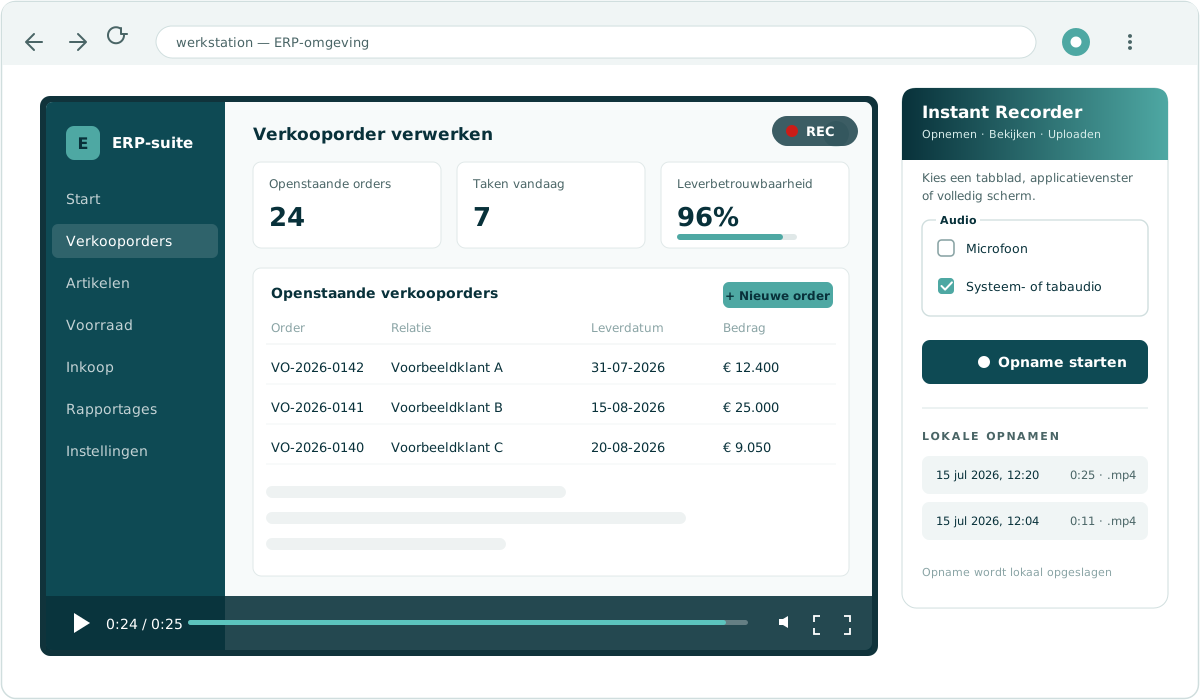
Powerful capabilities for building digital work instructions.
Six core modules — developed within the collaboration with TNO and used daily on the shop floor at Dutch manufacturing companies.
From video and speech to steps
An experienced worker records and explains the process. The platform turns audio and video into a first set of structured steps, so engineers and work-prep staff spend their time reviewing and refining instead of typing from scratch.
One source, many languages
Translate work instructions automatically to 25+ languages, so every worker — including external partners or service technicians — gets the explanation in a language they understand.
Video-step sync
Each step is linked to the matching moment in the video. Because text, visual context and sequence are connected, there is less room for interpretation on the floor.
Audit trail & compliance
Every session is logged and version-bound, so it is clear who followed which version and when. Suitable as supporting evidence for ISO 9001, AS9100, IATF 16949 and customer audits.
Analytics dashboard
See where operators struggle, which steps are rewatched, and who has worked through which instructions. A practical input for targeted training and continuous improvement.
ERP, MES and PLM integration
Integrations with existing business software — ERP, MES and PLM. Based on a work order, the right instruction is shown, so operators work with the current, approved version.
From knowledge to execution — in one line.
Other platforms stop at producing an instruction. We link the instruction to planning, the skill matrix, and the work order — so knowledge is not only captured, but actually executed. By the right person. At the right moment. Demonstrably.
Operator captures
Your skilled worker records a short video of a process with their phone.
AI generates
Built on TNO research. Speech, image, and actions are automatically converted into a structured, multilingual step list.
Instruction is validated
Anyone who follows the instruction and answers the validation question correctly is demonstrably released. The skill matrix updates automatically.
Planning releases on readiness
Power Planning knows who is cleared for what. An employee cannot be scheduled for a task they have not yet been trained on.
Management gets real-time insight
Capacity, progress, competence gaps, and exceptions in a single overview. Including audit export for ISO 9001, AS9100, IATF 16949.
Start small. Scale when you’re ready.
Not every manufacturer is at the same point. Some companies want to get knowledge retention in order first — Package 1 is the right starting point. Others already have instructions covered, but want to take the step into operational orchestration — Package 2 is the logical next step. Both packages deliver the first working instruction within one hour. The difference is operational depth.
- Step generation from video and speech — first working draft in a single session
- Multilingual translation to 25+ languages
- Video-step synchronisation with cryptographic audit trail
- Analytics dashboard: see where operators struggle
- Validation questions per instruction
- Indicative onboarding-time reductions of around 30% (TNO whitepaper, 2024)
- 20–40% error reduction with standardised work instructions (Fraunhofer, 2021)
- Full audit trail for ISO audits
- Craft knowledge demonstrably retained, independent of who is on holiday tomorrow
COOs, plant managers, and HR leads of companies still working with paper manuals or scattered knowledge. Companies that want to start without an MES or ERP project.
- Skill matrix that updates automatically from instruction data
- Task release on readiness
- Work order → instruction (automatic trigger via ERP and MES integration)
- ERP, MES and PLM integration with your existing business software
- SSO via standard identity providers (Azure AD, SAML, OpenID Connect)
- Hosting in your Azure tenant or on-premise
- Real-time capacity and competence dashboard
- Audit export per employee, per task, per version
- Planning on demonstrable competence instead of availability
- Shift handovers without knowledge gaps
- ISO, AS9100, and IATF audits without panic
- Operational continuity when key personnel leave
- A concrete answer to MES integration and SSO questions from IT
COOs and plant managers of manufacturers ready to move from “we have work instructions” to “we steer on operational readiness”. Companies whose IT teams require standard identity providers and hosting in their own Azure tenant. Companies under audit pressure from medical, aerospace, or automotive.
Same foundation. Different operational depth.
| Capability | Package 1 | Package 2 |
|---|---|---|
| AI instructions from video | ✓ | ✓ |
| Multilingual translation (25+) | ✓ | ✓ |
| Audit trail per session | ✓ | ✓ |
| Analytics dashboard | ✓ | ✓ |
| Validation questions per instruction | ✓ | ✓ |
| Skill matrix from instruction data | On request | ✓ |
| Task release on readiness | On request | ✓ |
| Work order → instruction (ERP-trigger) | On request | ✓ |
| Capacity and planning dashboard | On request | ✓ |
| Deep MES integration | On request | ✓ |
| SSO (Azure AD / SAML / OpenID) | On request | ✓ |
| Hosting in your own Azure tenant or on-premise | On request | ✓ |
| Audit export per employee per task | On request | ✓ |
What digital work instructions can deliver.
Indicative figures based on practical experience with Dutch manufacturers and in line with research on digital work instructions. Actual impact depends on process, organisation and user adoption.
Less dependent on individual employees.
More grip on execution.
In manufacturing organisations, the real risk is rarely the absence of work instructions. It usually sits elsewhere: an experienced worker is out and it is unclear who can take over, an audit comes around and the documentation is out of date, or an operator is scheduled for a machine they have not yet been cleared for.
Package 2 makes these dependencies visible and therefore more manageable.
Structured onboarding
Instruction and validation in one flow, so new colleagues can fall back on the same explanation step by step.
Less room for interpretation
Operators work with the current, approved version, with text and visual context connected.
Knowledge retention
Practical know-how stays in the system — even when an experienced worker leaves or moves on.
Multilingual workforce
Automatic translation to 25+ languages — also usable for service technicians, partners and customers.
Better deployability
The skill matrix grows with every completed instruction, supporting planning based on demonstrable competence.
Audit & compliance
Traceable session logs support ISO 9001, AS9100 and IATF 16949 documentation needs.
Not only authoring instructions — also making sure they get followed.
| Traditional digital work instruction tools | Instant Instructions |
|---|---|
| Instructions only | Full operational context |
| Stand-alone system | Planning + skill matrix integrated |
| Static documentation | AI-generated and version-controlled |
| No link to work order | Work order → instruction automatically |
| Roadmap follows investors | Roadmap follows TNO research + customer data |
| Own cloud, no choice | Azure tenant or on-premise — your call |
The roadmap follows what customers run into in practice.
Development is driven by what shop-floor users, work-prep staff and operations managers actually need — not by feature showcases. Improvements are added where they make a concrete difference in daily use.
Audit depth for regulated sectors
On top of the standard cryptographically verified session logs (in both packages), Package 2 provides audit export at the employee and task level — suitable for medical-device compliance, AS9100, and IATF 16949.
MES integration and secure hosting
On top of the standard ERP and MES integration in the platform, Package 2 delivers deep MES coupling with automatic work order → instruction trigger, SSO via Azure AD / SAML / OpenID, and hosting in your own Azure tenant or on-premise inside your network.
Ecosystem integration as architecture
Instant Instructions is designed to fit into your existing suite — not as an isolated platform. Package 2 delivers this as an architectural starting point, not as a feature.
Honest answers to real questions.
How quickly can we get started?
Do I need to rework existing documentation?
What if my workforce is not technical?
Can it integrate with our ERP, MES and PLM systems?
What makes you different from Azumuta, VKS, or Dozuki?
Instant Instructions is a process control platform. The difference is not in how instructions are created (we use video and AI; they mostly rely on manual authoring), but in what happens afterwards.
With us, the instruction is the starting point for standardised execution: who follows which version is logged. Where an operator struggles is surfaced through analytics. Who is not yet certified for a task cannot be scheduled (Package 2). And anyone who edits an instruction does so through a review workflow — not an uncontrolled text edit.
That is the difference between documenting and controlling. Competitors stop at the first. We are built for the second.
Read the full comparison: Azumuta alternative · VKS alternative · Dozuki comparison.
Is our data secure?
What is the difference between Package 1 and Package 2?
Can I upgrade from Package 1 to Package 2 later?
What does it cost?
Which industries is Instant Instructions suited for?
How long does it take to create my first work instruction?
Developed with TNO
Start a pilot on your own production line.
A focused, practical evaluation. We pick one production line and one or two reference procedures, capture baseline KPIs, and prepare a first working instruction on your own process and data.
- Pilot can usually start without a heavy IT project · NDA available · your own data
- First working demonstration in a single session
- Results compared against your own KPIs after a few weeks
- Joint venture with TNO — your instructions remain your property
Three ways to start
Pick the entry point that matches your stage.
No sales pitch — just practical information at the depth that fits where you are right now.
TNO whitepaper
8 pages, co-published with TNO. What works, what doesn't, and the pitfalls every operations director knows. Straight to your inbox.
Download whitepaper →60-second demo
Short video of the platform in action — from video capture to live work instruction. No sign-up, no email.
Watch the demo →Plan a practical session
30 minutes on one of your own processes. We discuss what fits, what doesn’t, and what a first instruction could look like. NDA available · your own data.
Plan a practical session →Prefer to talk? Call +31 40 309 80 18 — we respond within one business day.